Appearance
IntelliTrack 2026 Sprint 26.10–26.11 Release Notes
Released: June 22, 2026
Sprint release with new features, improvements, and fixes for the general platform and the Fixed Assets, Rotational Assets, and Consumable Inventory bundles.
General Platform
Improvements
- The ability to apply Date and Date/Time filters has been significantly improved across the entire platform. The newly added filters, found under the Add Filter > Field dropdown list, are seen below:
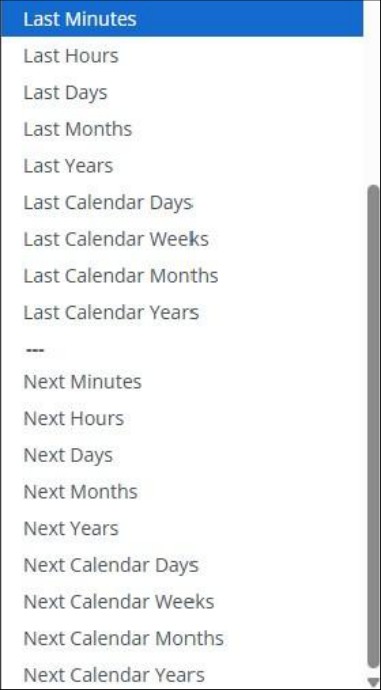
- Users can now create and manage Subscriptions using the newly added Date and Date/Time filters.
- The alert message that is generated at the Reset Password page has been updated so that the User understands that they need to restart the password reset process.
Fixed
- On the Assets page, when a Search string contains a Single Quote, the exported .csv file no longer displays the returned values as Undefined. This has also been resolved on the following pages:
- Inventory
- Items
- Assignees
- Service Contracts
- Asset Movement Report
- Consumable Orders Report
- Item History Report
- A UDF Field Name that is entered as lowercase is now properly sorted in the Add Filter dialog > Field dropdown list as well as in the Manage Columns list.
- An error message is no longer generated at the BarTender Label Print popup when a Printer and Label Template are selected. In addition, multiple labels are now printed successfully.
Fixed Assets Bundle
New Features
- A Cycle Count can now be deleted. This functionality will allow for the removal of dated Test and/or Cycle Counts from the Tenant, as needed.
Rotational Assets Bundle
Fixed
- The quantity discrepancy that was found between the Checked Out Assets Dashboard > Assets Past Due Widget and the Past Due Assets Report has been resolved.
Consumable Inventory Bundle
Fixed
- On the Items page, the following fields can now be found in the Manage Columns list:
- Expiration Dates
- Lots
- Serial Numbers
- An Item Number that contains the special characters listed below can now be successfully added to a Receipt Order (Add Receipt page) and to a Receiving Order (Add Receiving page and Edit Receiving page).
- # (Pound Sign)
- & (Ampersand Sign)
- + (Plus Sign)
- ' (Single Quote)