Appearance
IntelliTrack Q3 2024 Release Notes
Released: October 7, 2024
Quarterly release introducing seven major features - VeriMy Gen2, site contacts management, history reports enhancements, bulk actions by asset or serial numbers, Honeywell RMA enhancements, container enhancements, and DEPOT sites - along with new features and fixes for the general platform, IntelliTrack Mobile, and the IT Assets, Fixed Assets, Rotational Assets, Consumable Inventory, and Mailroom bundles.
VeriMy Gen2
Additional enhancements were implemented in Q3 to the VeriMy application, primarily around Check Out / Check In functionality and device Status.
New Features
The following features are displayed in the screenshot seen here.
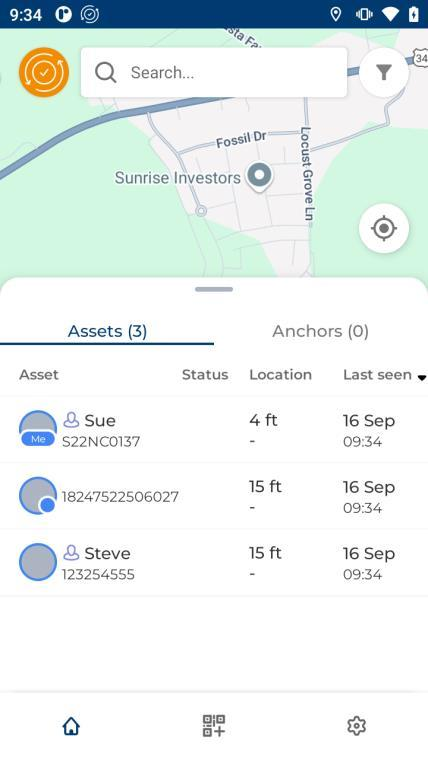
When an Asset is Checked Out using the Assignee ID, the Assignee Name will be displayed on the screen. When an Asset is Checked Out using IntelliTrack credentials, the Username will be displayed on the screen.
When an Asset is Checked In, the Assignee Name or Username will be removed from the screen.
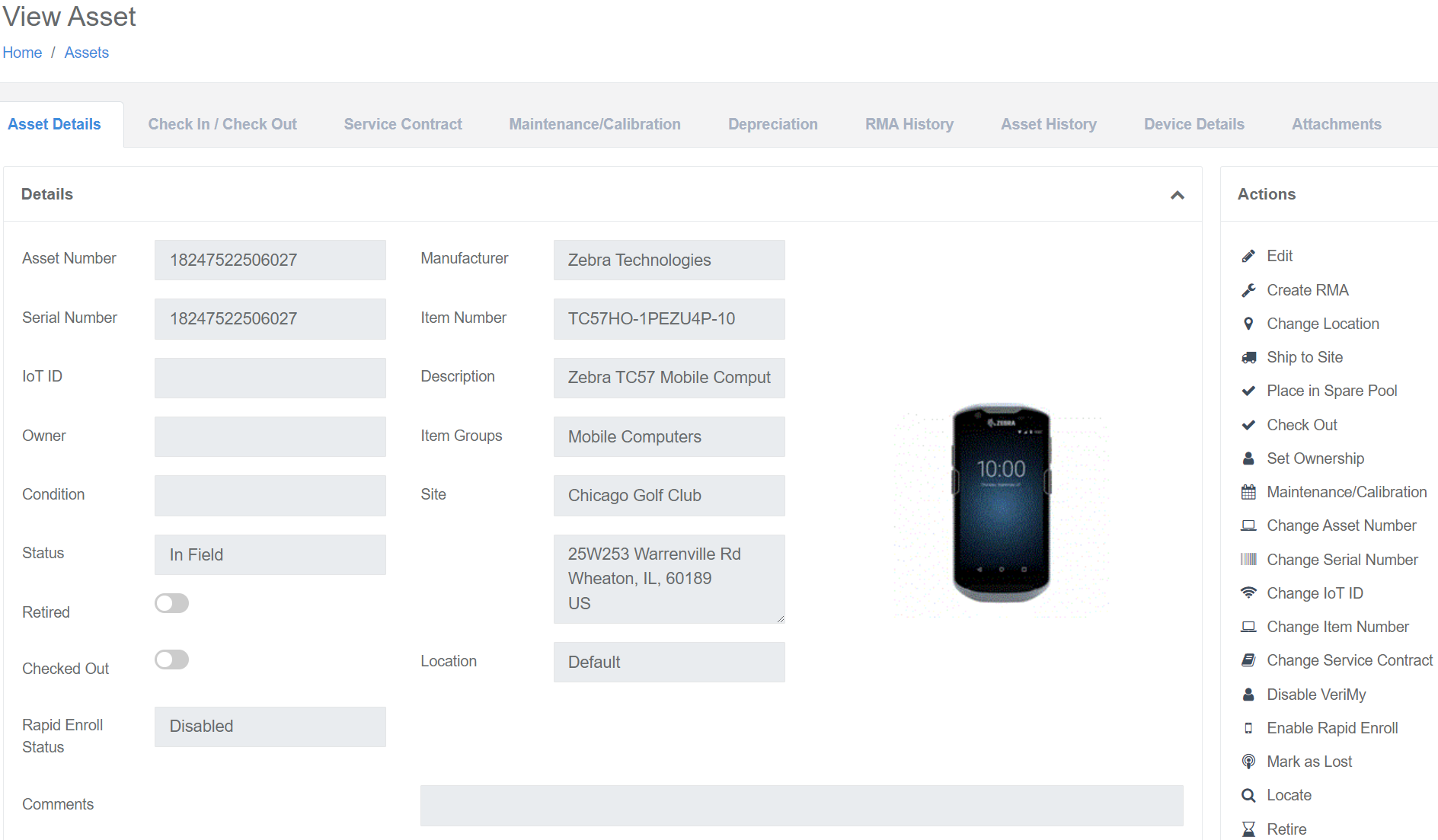
A new Action, "Mark as Lost" has been implemented at the View Asset page. This Action will only be displayed if the following conditions apply:
- The User has VeriMy permissions.
- The Asset is registered in VeriMy.
- The VeriMy status for the device is not identified as Lost.
Fixed
- If an Assignee is both a Check Out Assignee and a Site Contact, VeriMy now validates the Assignee at Check Out.
Site Contacts Management
The ability to enter Site Contacts has been implemented. This new feature will enhance the Assignee functionality as well as Site details, which when applied, will improve the Shipping process.
A Site Contact option has been implemented on the Add / Edit Assignee pages.
If Site Contact is toggled On, as seen below, the Assignee is a Site Contact for the selected Site. The Assignee ID, Site, Name, and Email fields are mandatory fields when the Site Contact option is toggled On.
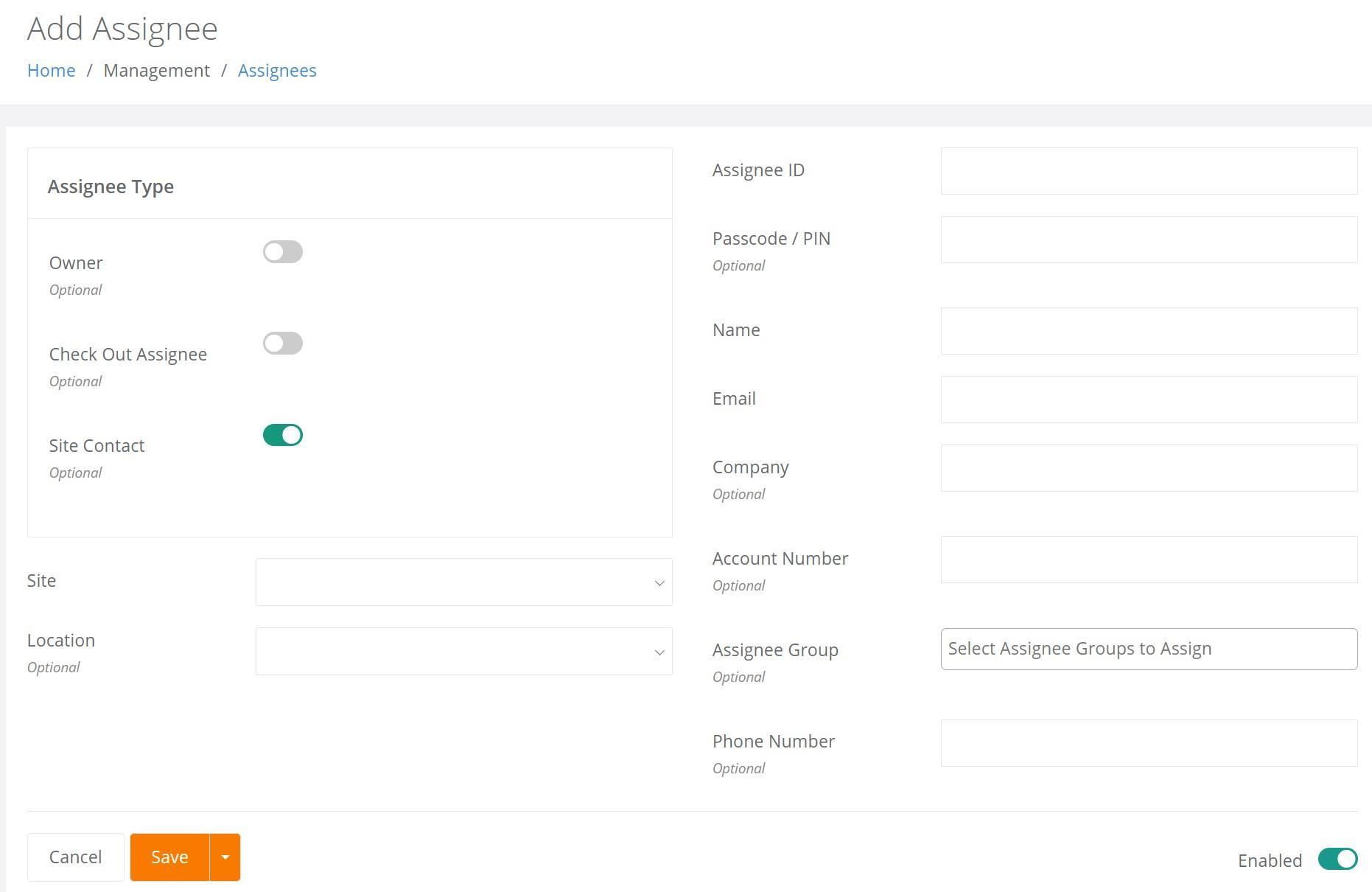
The Site Contact Assignee Setting can now be Enabled or Disabled via an Assignee Import.
Site Contacts for the Site are now displayed on the Edit Site page in the Site Contacts field, as seen below. This field is "Read Only" and applies to all bundles except Mailroom.
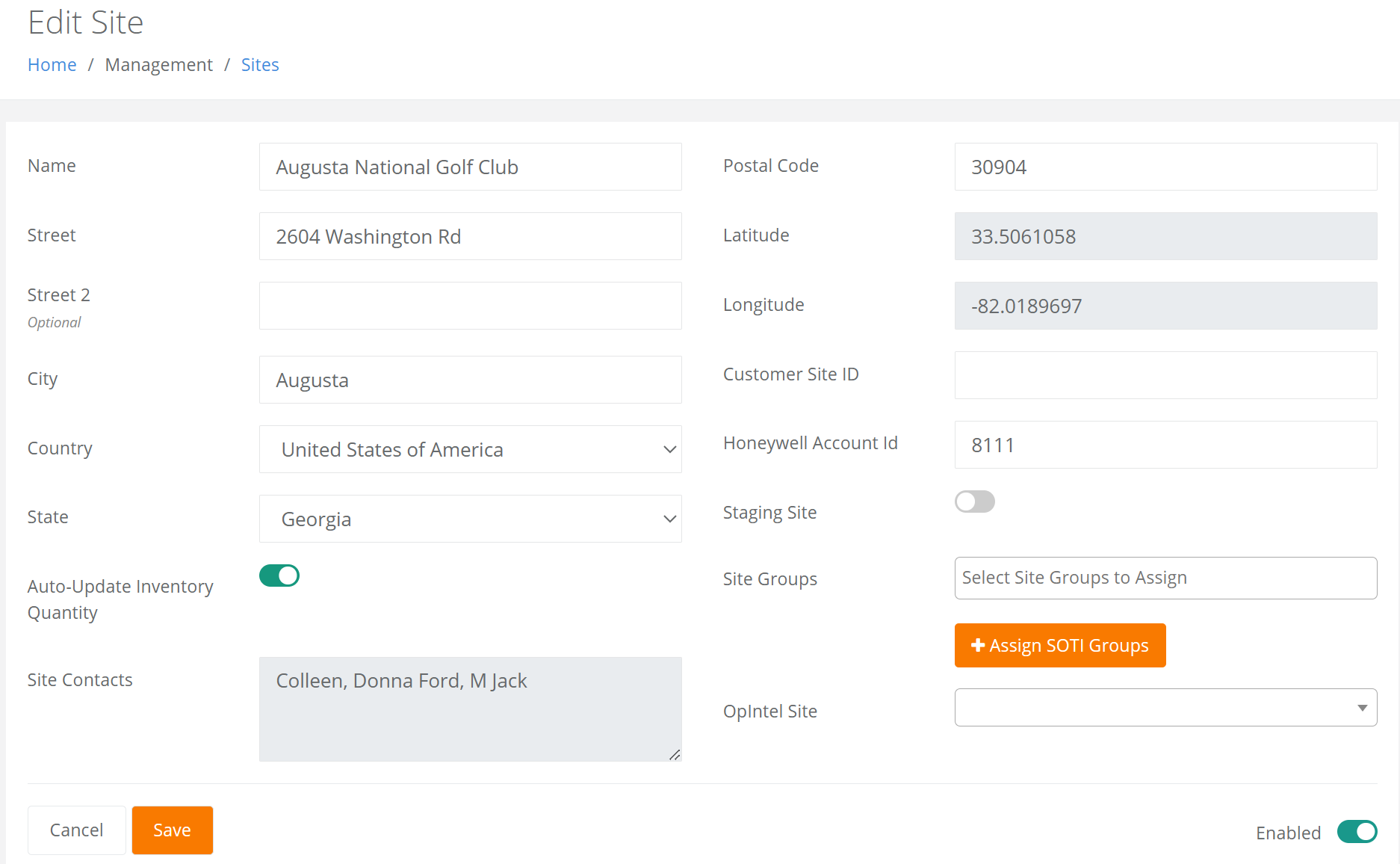
Note: For the Consumable Inventory bundle, a Site Contact will automatically receive an Inventory Item Reorder Notification email for an Item when Item Inventory at the Site falls below the item minimum quantity.
Performing Bulk Actions By Asset or Serial Numbers
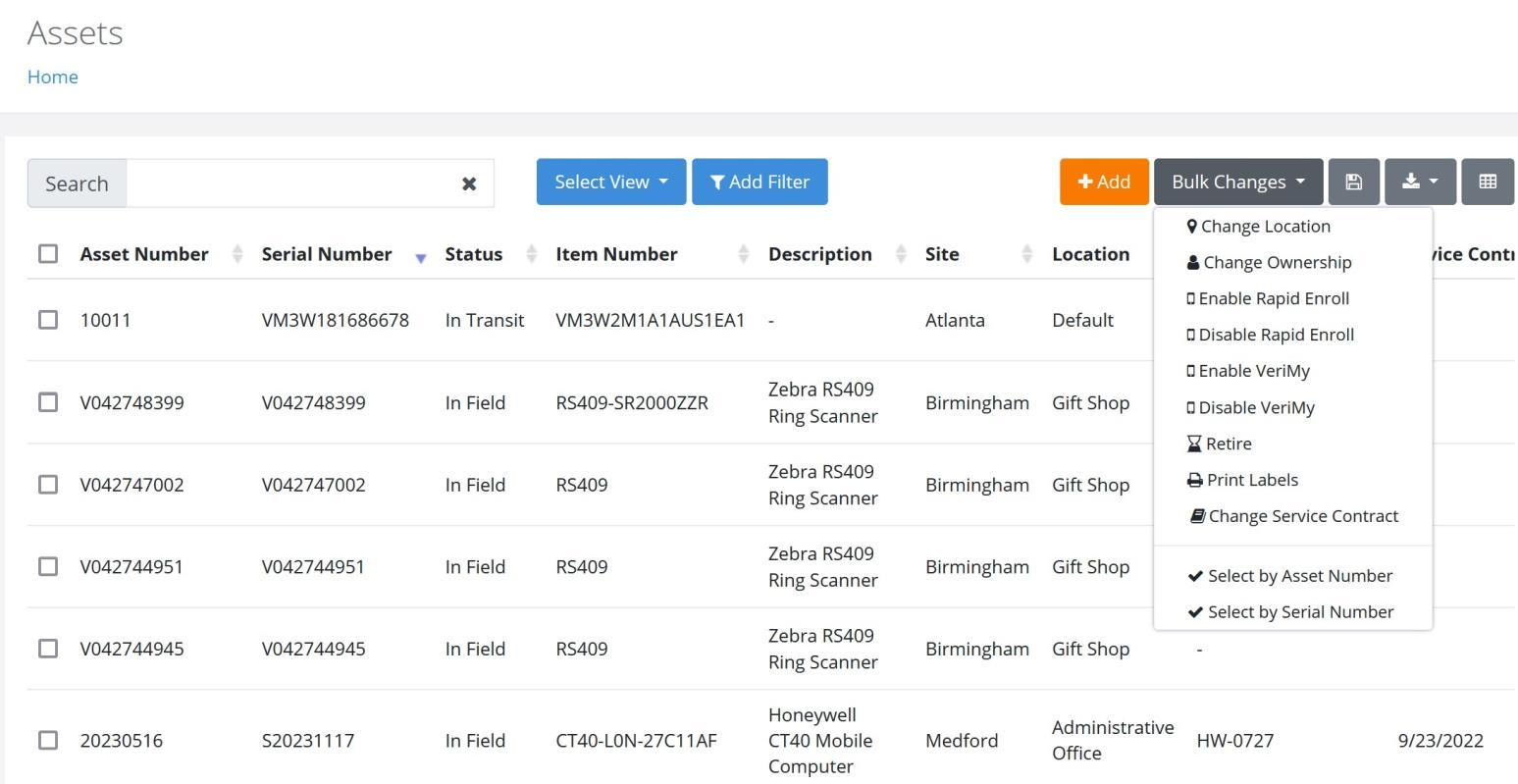
A more efficient process has been implemented for performing Bulk Changes to Multiple Assets, as detailed below.
Two new options, Select by Asset Number or Select by Serial Number are now found under the Bulk Changes option, as seen below.
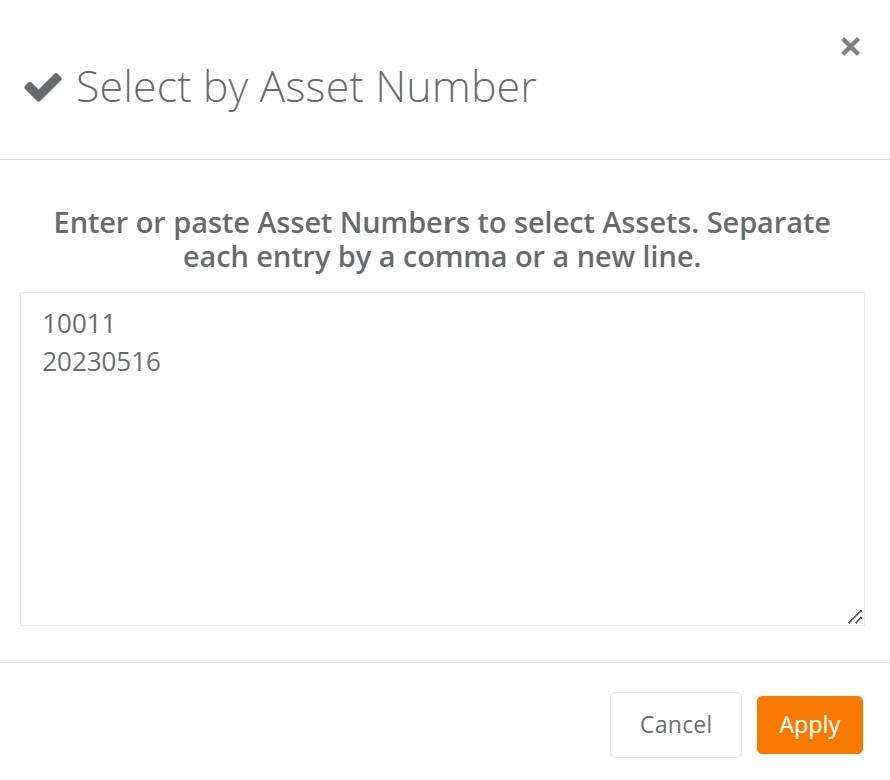
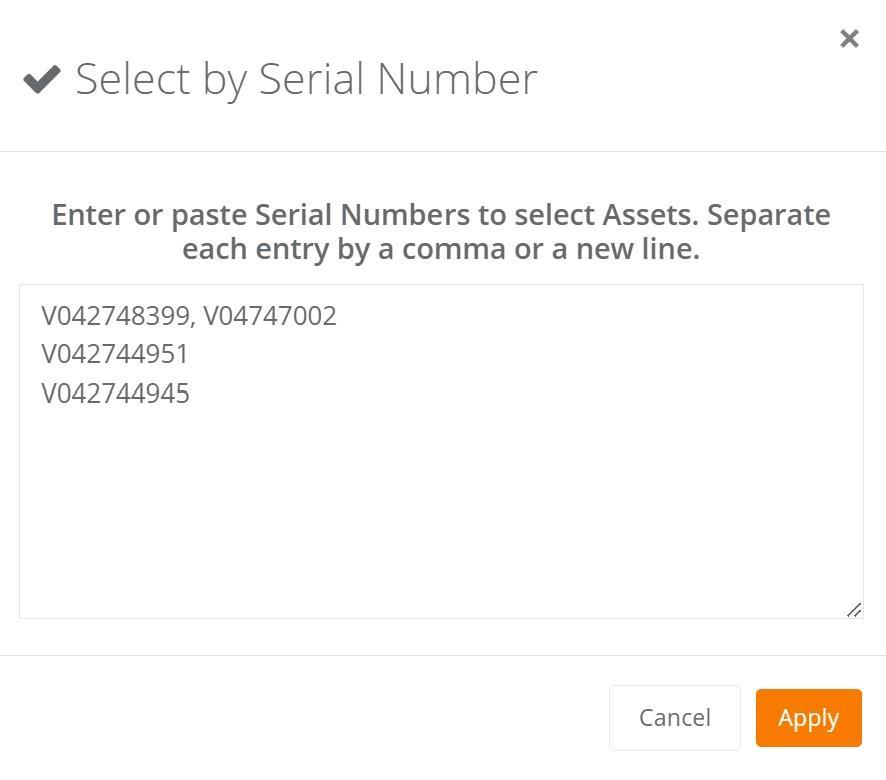
Upon selecting either of these two Bulk Changes options, the User will enter or paste the appropriate values into the popup screen provided and then click on Apply.
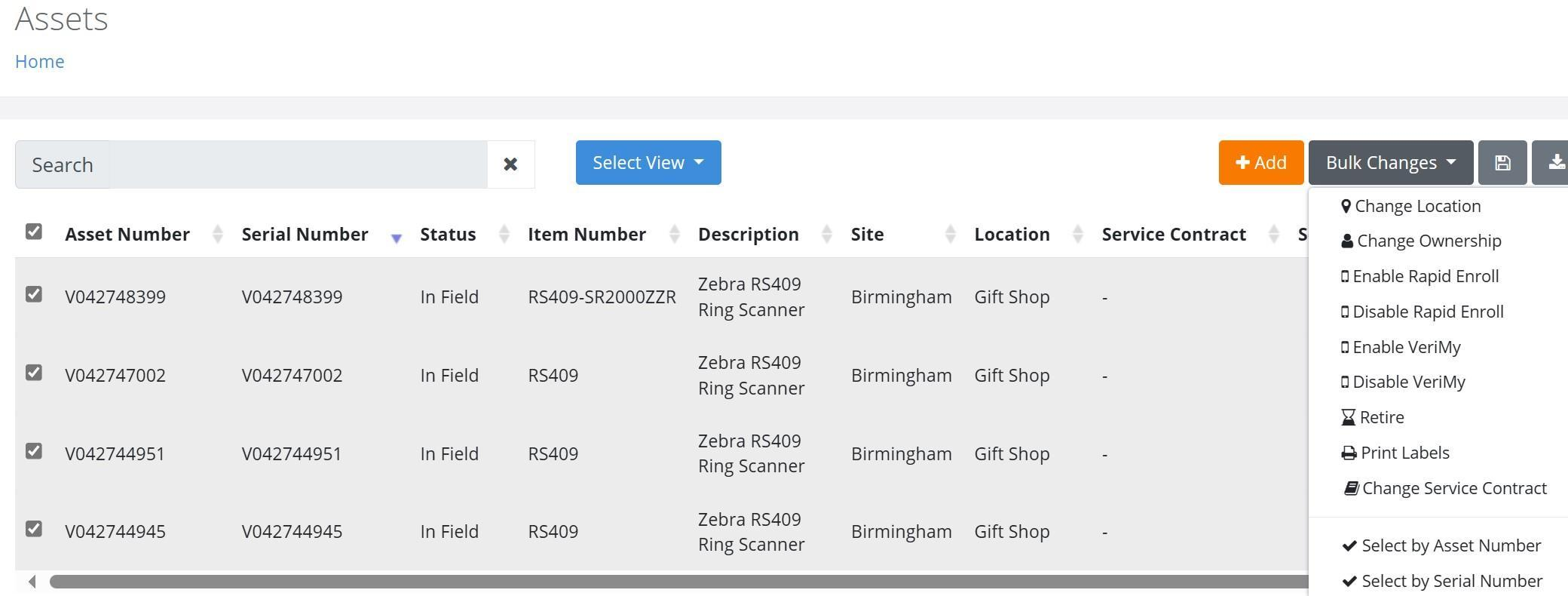
Once entered, the Assets will be selected on the Assets page, as seen below. The Bulk Change transaction can then be performed.
Fixed
- The Bulk Changes form by Asset Number or Serial Number no longer freezes when Assets are entered that contain apostrophes.
History Reports Enhancements
Improvements have been made to IntelliTrack's History Reports for both Assets and Items, as detailed below. These reports can be found on the Insights page and can be added to the Home page by clicking in the Star to designate it as a "Favorite".
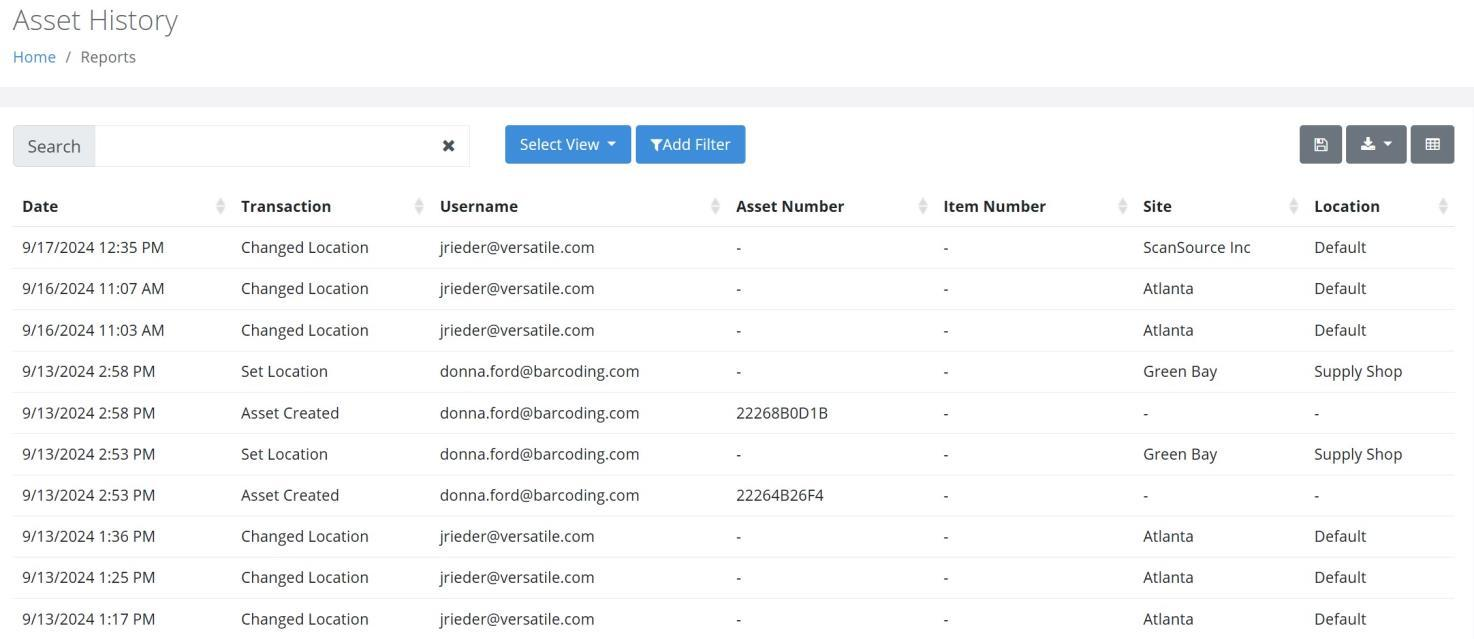
The Asset History Report, as seen below, can be found on the Insights page. This report, which currently applies to the Fixed Assets and Rotational Assets bundles, will provide Users with a means to view the Asset History for all Asset Transactions and Tasks.
The UOM "Each Count" and "Extended Quantity" (Transaction Quantity x UOM Each Count) can now be incorporated into the Item History Report via the Manage Columns functionality.
Note: This feature is available in the Consumable Inventory bundle.
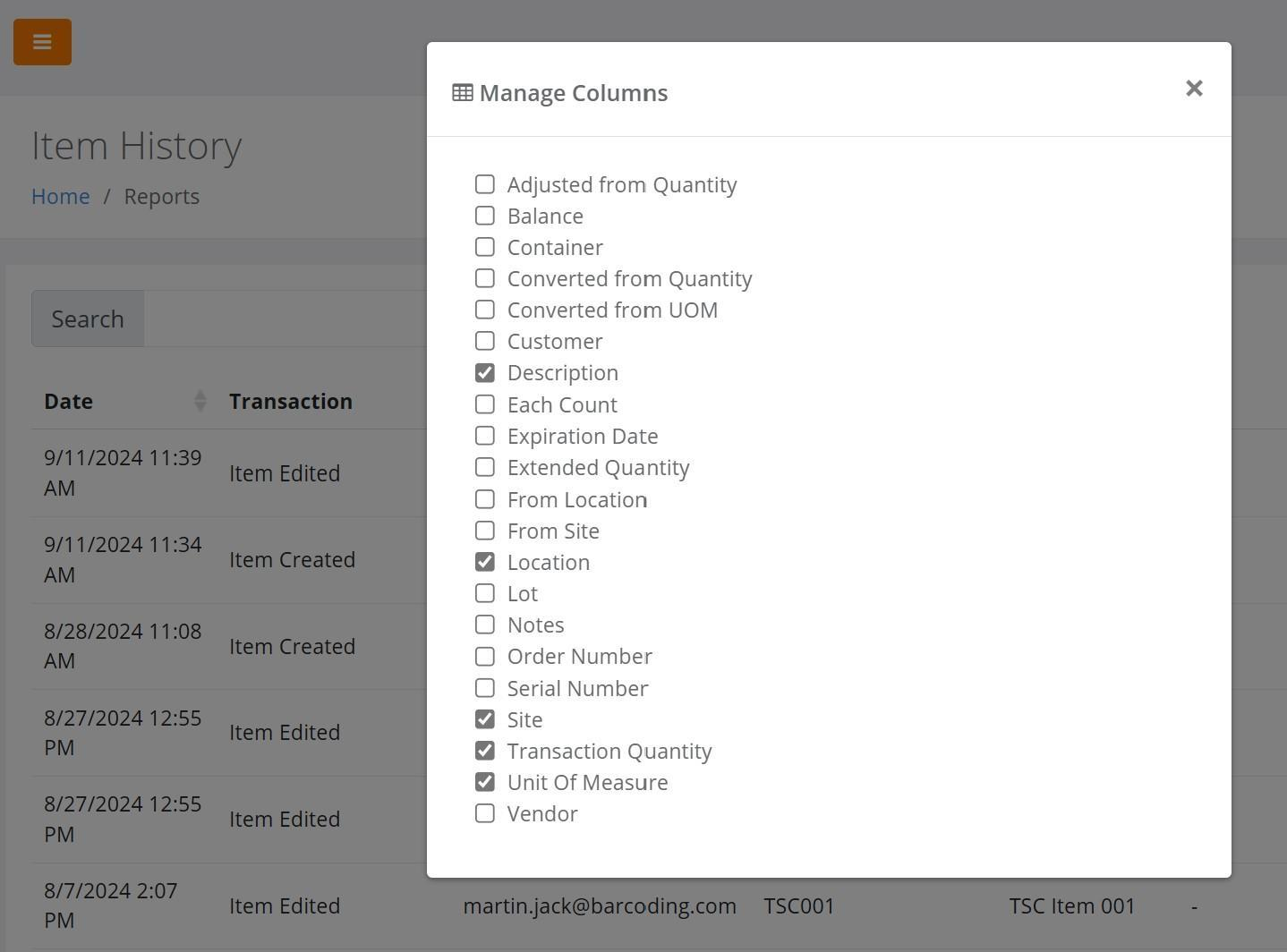
Item History (Item Added, Edited, and Deleted) is now found in the Fixed Assets bundle and the Rotational Assets bundle via the Item History Report.
Honeywell RMA Enhancements
Honeywell's investment in improving their integration with IntelliTrack has resulted in the following enhancements:
- Improved customer validation.
- Ability to enter a detailed description of the issue with the device in the "Customer Notes" field.
- "Real-Time" Status updates to improve visibility of the repair.
- New "Ship To Contact" information for more accurate delivery of repaired devices.
- New "Quoting Contact" for billable repair notification.
Container Enhancements
The Container feature, which was introduced in the Q2 Release Notes, has been further enhanced as follows:
- A "Create Date" column has been incorporated into the Containers page.
- An adjustment can now be performed via the Add Item to Inventory form when the Item exists in a Site-Location and in a Container for the same Site-Location.
- An Item that resides in a Container can now be moved into a regular Inventory Location.
In addition, the following issues were resolved:
- An Asset that resides in a Container can no longer be moved to a different location from the Container itself.
- When an Item is moved To or From a Container, the Item balance no longer posts as zero.
- At the Edit Container page, a 500 Error is no longer displayed upon pressing Save when the User deletes an Item that uses Expiration Dates.
DEPOT Sites
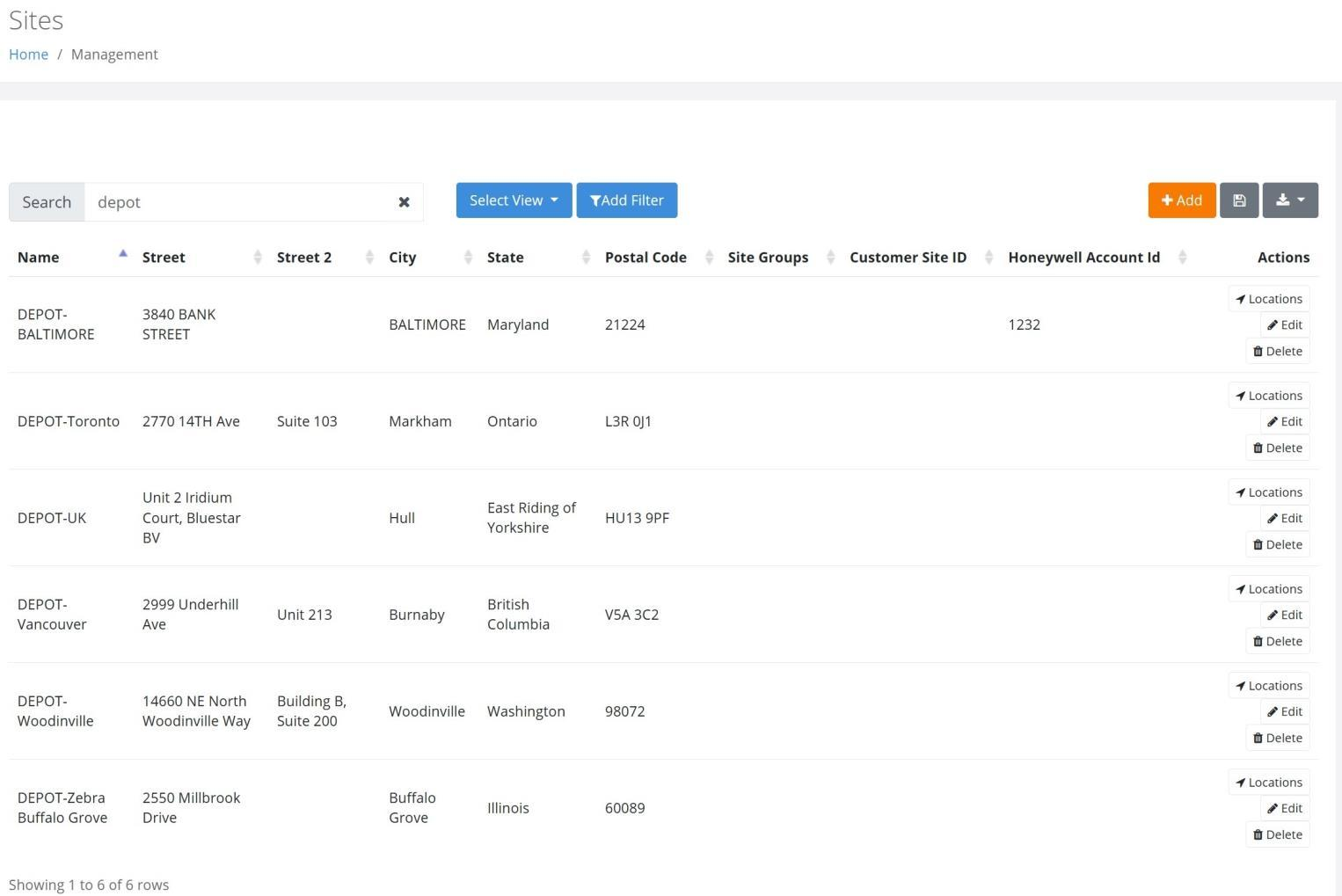
Sites that begin with a "DEPOT" prefix have been implemented within each Tenant that has the IT Assets bundle.
These Sites, as seen in the screenshot below, will be utilized to manage various functions within the IntelliTrack platform, to include Return Default Sites following Repair and Spare Pool Sites.
General Platform
New Features
Users are now notified via a popup message when a .csv Import file contains numbers in Scientific Notation.
A Tenant Setting now allows for the generation of a unique Assignee ID.
The "Is Quarantine" setting for a Location has been removed.
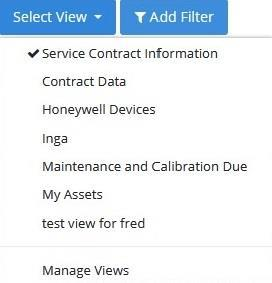
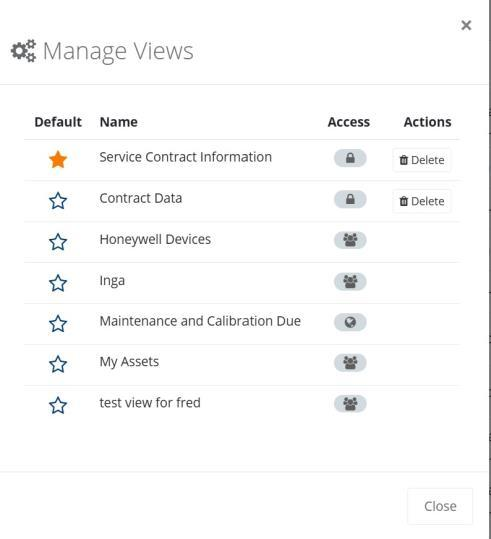
On the Select View form, "Configure" has been modified to "Managed Views", as seen below.
Fixed
- When changing an Asset's Owner from the View Asset > Actions Menu > Change Ownership option, the title for the Ownership popup has been corrected from "Set Ownership" to "Change Ownership".
- At the Add and Edit Assignee pages, the Email field is now validated for an acceptable Email Address format.
- The Save View functionality has been optimized to respond to many different Filter combinations.
- Saving a newly created View at the Assets page no longer generates an "Already in Use" message.
- The Management > Workspaces > Add Workspace form is now functioning properly.
- When performing a User Import for an existing User, the Site and Site Group fields are now optional.
- The Carrier and Warranty Information as well as the User Defined Fields are now displayed when a Save and Clone transaction is performed in the Add Asset mode.
- Note: This applies to the IT Assets, Fixed Assets, and Rotational Assets bundles.
- The Import Users feature has been optimized for improved stability.
- A Subscription can now be successfully created on the IoT Read Zones page.
- An Item that is In Use can no longer be Disabled.
- On the Select View > Manage Views popup, a Default Page View can now be applied.
- On the Manage Views popup, the proper Tool Tip is now applied to Private, Public, and Shared views.
- A Subscription to the Assets page is now successfully sent via email.
IntelliTrack Mobile
Fixed
- An appropriate message is now displayed when a Lookup List is empty.
IT Assets Bundle
New Features
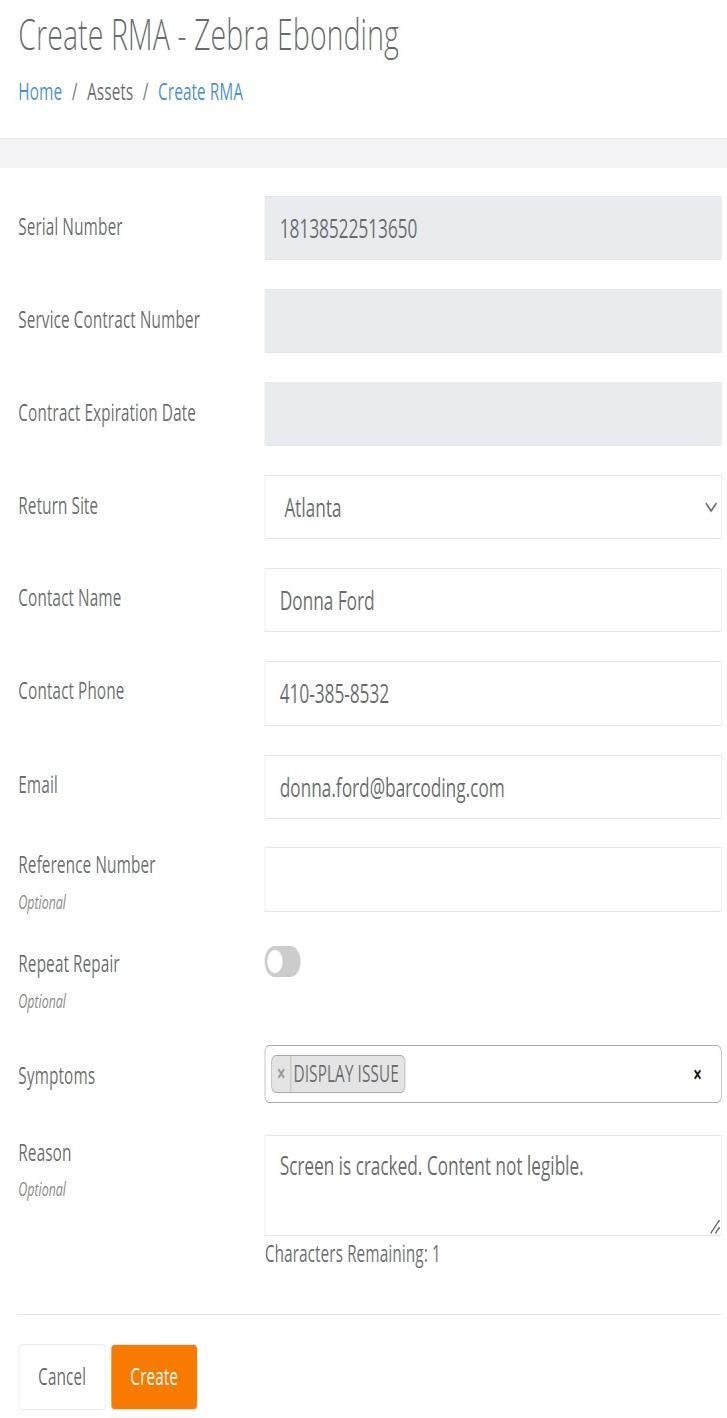
On the Create RMA popup screen, the Reason field has been limited to 40 characters and the number of characters will now be displayed as this field is populated.
Fixed
- At the Add Asset page, the picture of the Parent Item is now properly displayed when performing a Save and Clone transaction.
- Note: This also applies to the Fixed Assets and Rotational Assets bundles.
- Cellular Carrier data is now being populated on the Assets page.
- The Assets by Site report can now be sorted by the Assets column.
- Note: This also applies to the Fixed Assets and Rotational Assets bundles.
Fixed Asset Bundle
Mobile Application
Fixed
- The Sort Order is now properly applied to the Condition List at the Undirected Asset Inventory and New Asset Inventory pages.
Rotational Assets Bundle
Fixed
- On the Edit Reservation form, the Asset Number validation now correctly displays "Asset Number is Required".
- When performing a Check In By Assignee and the selected Assignee is not the Check Out By Assignee, the Asset Number is not populated when attempting to Add the Asset Number. However, a Validation Error message is now displayed to confirm that the Asset is not Checked Out to the Assignee.
Mobile Application
New Features
- A new method for Bulk Checkout of Assets has been implemented.
- As each Asset is scanned, it is validated and displayed as a list on the screen.
- Upon scanning all Assets, the User taps on the Submit button.
- The User then verifies that all Assets will be checked out on the order and the Bulk Checkout is performed.
Consumable Inventory Bundle
New Features
- Users can now select an Item to Issue from the available Inventory.
- Note: When adding a line item to the order, the options in the Item Number drop-down list are limited to the Items found in Inventory for the Sites that the User has access to.
- The "UOM Each Count" and "Extended Quantity" (Transaction Quantity x UOM Each Count) can now be incorporated into the Consumable History Report via the Manage Columns functionality.
- The "Ordered Quantity" and "Actual Quantity" columns can now be incorporated into the Packing List Report via the Manage Columns functionality.
- The "Transaction Quantity" and "Actual Quantity" columns can now be incorporated into the Goods Received Report via the Manage Columns functionality.
- Restricting the Inventory Item Reorder Notification based on Site has been implemented by adding the capability to designate an Email recipient at the Site level.
Fixed
- A Page Title has now been implemented at the Bulk Changes > Change Location page for a Consumable Inventory Bulk Move Operation. In addition, the Inventory breadcrumb now properly directs the user to the Inventory page.
- A Server Error is no longer generated when performing an Item Import for new items.
- Note: This applies to all bundles except Mailroom.
- On the Consumable Reorder Report, the Item Quantity is now summed by Site. If this sum is at or greater than the minimum quantity, the item will not appear on the report.
- The Minimum Quantity Amount for an Item by Site as set in the Reorder Points Tab now accounts for Inventory that resides in a Container.
- An Item that uses Serial Numbers is now properly moved out of a Container after a Bulk Change > Location is performed, or a Change Location is performed from the Inventory page.
- An Item that is deleted from a Container can now be moved into the Parent Site-Location of the Container via the Select Destination popup.
- An Object Error is no longer displayed when a Change Location (Single Item Move) is performed for an Item that uses Serial Numbers and resides in a Container.
- The Inventory Item Reorder Notification is now properly generated when an Item Inventory transaction is performed for an Item two separate times and the total Site-Item Quantity is above the Site Minimum Quantity.
Mobile Application
New Features
- A Tenant Setting has been implemented that allows the User to Enable or Disable Auto-Numbering for:
- Check Out Orders
- Issue Orders
- Receipt Orders
- Return Orders
Fixed
- In a Picking Order, a Pick can now be performed on an Item when the Item Quantity resides in a Site-Location that is not set as the Default Site.
- A User with the Role of "User" can now successfully set the Order Number when it is automatically numbered at the Check Out, Order Issue, Order Receipt, and Order Return screens.
Mailroom Bundle
New Features
- On the Import Assignees page, the Optional Fields for Site Contact are no longer displayed in the Required Fields column.
Mobile Application
Fixed
- The Sort Order is now properly applied to the following popup lists:
- Package Type
- Carrier
- Shipping Method
- Condition
- When tapping on the Recipient entry from the Select Recipient popup, the intended Recipient can now be selected as the Package Recipient.
- The Package Recipient Assignee Type can no longer be Disabled when the Assignee is In Use, i.e., has received packages in the Packages page.