Appearance
IntelliTrack 2026 Sprint 26.7 Release Notes
Released: May 7, 2026
Sprint release with improvements and fixes for the general platform and the IT Assets and Rotational Assets bundles.
General Platform
Fixed
- The User is now able to Save Changes when amending a Saved View.
- The Bulk Changes options for Change Ownership and Retire that are found on the Assets page are no longer visible to a User with the Role of Viewer.
Improvements
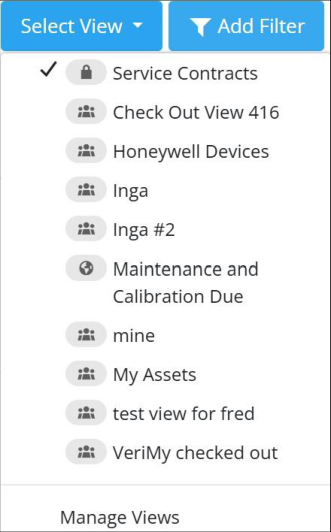
- Users can now identify a View's Access Level (Private, Shared, or Public) directly from the Select View drop-down list, as seen below. This improvement includes Icons that have been placed to the left of the View Name along with a Tool Tip.
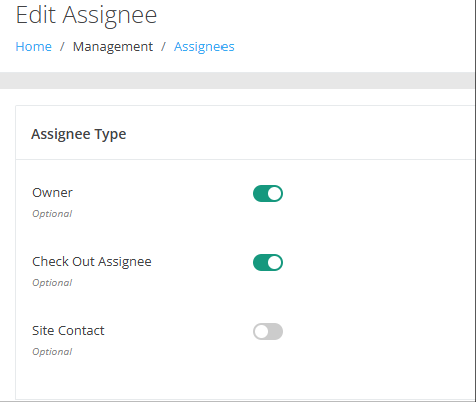
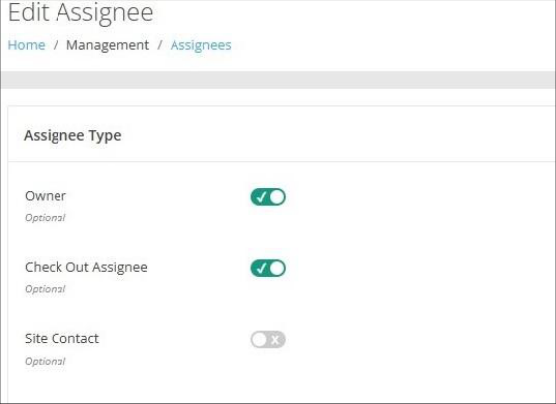
- All Toggles throughout the platform have been redesigned to clearly indicate whether they are Enabled (On) or Disabled (Off).
IT Assets Bundle
Fixed
- On the Assets page, the Last Connected Date, which can be added through Managed Columns, is now correct.
Rotational Assets Bundle
Fixed
- A Checked Out Asset in a Site that is part of multiple Site Groups no longer produces duplicate entries at the Checked Out Assets Report.
- Performance and error-handling improvements have been implemented on the Checked Out Assets Report.
Improvements
- When performing an Asset or Container Check Out (Assets > Check Out page), the Due Back Date/Time chosen is no longer "off" by one hour, i.e. stamped as 1:00 AM vs. 12:00 AM.
- On the Assets > Check Out page with the Type Ahead search Enabled, Users can now look up an Assignee by Email Address, Name, or Assignee ID.
- On the Checked Out Assets Dashboard, an Asset that is in a Container is no longer included in the count of Assets available for Check Out.